AI & Development
How I Use AI as a Developer
A context-engineering framework for working with LLMs day to day — what the model needs to see, what to leave out, and where to draw the boundary.
author: Rajan Chavadaauthor: Rajan Chavada
How I Use AI as a Developer
image: /placeholder.svgimage: /blog/images/ai-developer.jpg
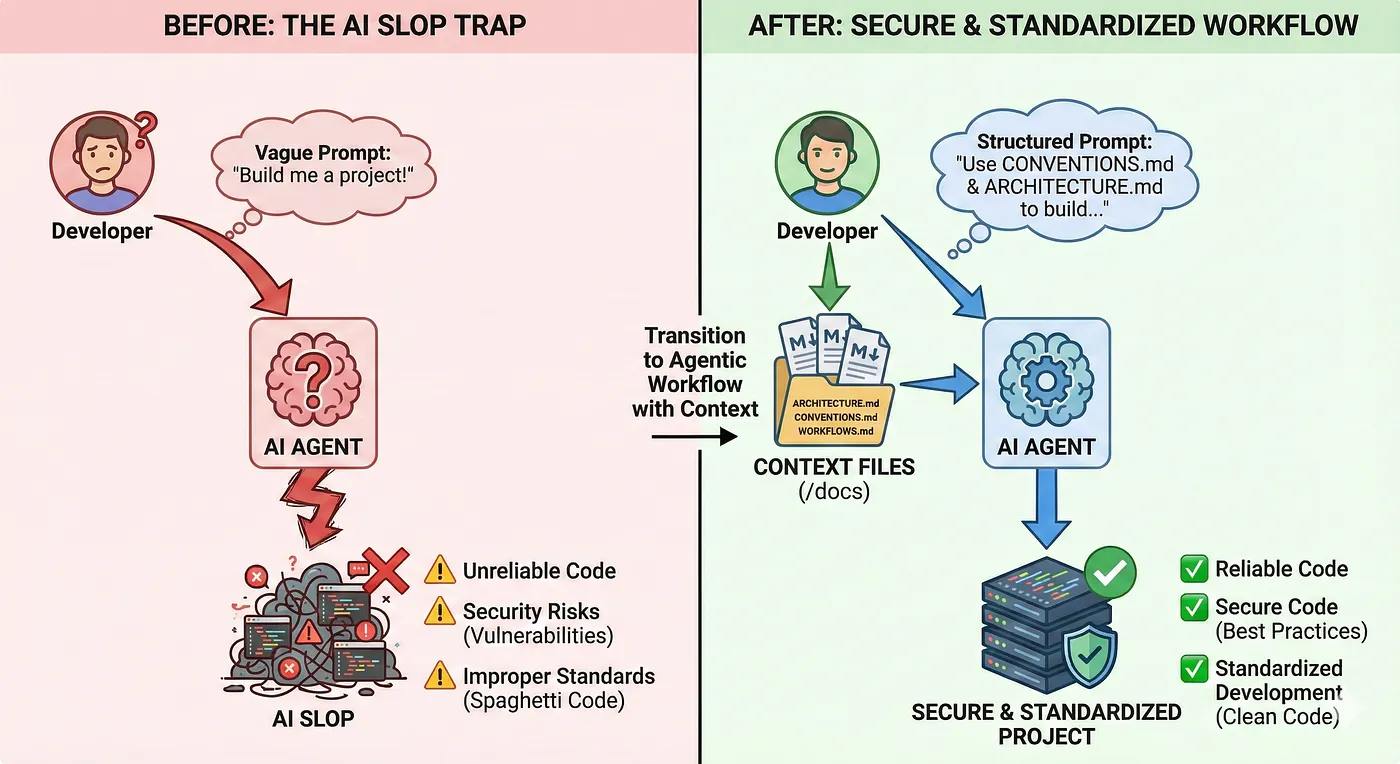
Everyone wants to use AI, generate applications in minutes by throwing in prompts into Cursor, Claude Code, ChatGPT, Gemini, or some other AI generation tool and expecting an AI SaaS B2B startup right in front of them.
category: AI & Developmentcategory: AI & Development
"Vibe coding" is allowing developers like myself and you reading this article to code, and iterate at the speed and efficiency of a whole team of developers.
But with all these new tools coming out, people fall into the trap of just writing "Do it for me" and hoping and praying it passes the tests, then pushing slop into production and wondering why their GPT wrapper is not wrapping.
I've built patent-pending agentic systems deployed to thousands of users in regulated financial environments at RBC. I've shipped AI tools that actually work. And I've learned this:
How I Use AI as a Developer# How I Use AI as a Developer
AI doesn't replace engineering, it amplifies it — but only if you know how to use it properly.
Everyone wants to use AI, generate applications in minutes by throwing in prompts into Cursor, Claude Code, ChatGPT, Gemini, or some other AI generation tool and expecting a AI SaaS B2B startup right in front of them.## Phase 1: Accelerated Learning
The Problem
Picture this:
"Vibe coding" is allowing developers like myself and you reading this article to code, and iterate at the speed and efficiency of a whole team of developers.
You go on LinkedIn and see that someone built another AI Startup, so you load up VSCode and... blank. You don't know what to make or how to make it. Let's say you know what to make — you have this niche you've discovered and know exactly how you are going to disrupt the market.
So where do you start?
But with all these new tools coming out, people fall into the trap of just writing "Do it for me" and hoping and praying it passes the tests, then pushing slop into production and wondering why their GPT wrapper is not wrapping.LLMs are not a black box that can ship your product. You can't always ctrl + c / ctrl + v and deploy. The understanding of the backend/frontend architecture as a developer is mandatory, as well as understanding the design patterns and complex architecture of an actual application.
Phase 1: Accelerated Learning
I've built patent-pending agentic systems deployed to thousands of users in regulated financial environments at RBC. I've shipped AI tools that actually work. And I've learned this: AI doesn't replace engineering, it amplifies it, but only if you know how to use it properly.Everyone wants to use AI, generate applications in minutes by throwing in prompts into Cursor, Claude Code, ChatGPT, Gemini, or some other AI generation tool and expecting an AI SaaS B2B startup right in front of them.

LLMs are not a black box that can ship your product. You can't always ctrl + c / ctrl + v and deploy. The understanding of the backend/frontend architecture as a developer is mandatory, as well as understanding the design patterns and complex architecture of an actual application.
Picture this,The Researchers: ChatGPT, Comet, Gemini, NotebookLM, Deepseek
The Researchers
-
ChatGPT
-
Comet You go on Linkedin and see that someone built another AI Startup, so you load up VSCode and blank. You don't know what to make or how to make, let's say you know what to make you have this niche you've discovered and know exactly how you are going to disrupt the market.
-
Gemini
-
NotebookLM
-
Deepseek
Phase 1: Accelerated LearningI jump from tool to tool for different perspectives and LLMs because it gives me that spark in my brain instead of just conforming to what output I've been given by any one of these tools.
These are the RESEARCHERS. I jump from tool to tool for different perspectives and LLMs because it gives me that spark in my brain instead of just conforming to what output I've been given by any one of these tools.
Simple prompt, massive results:
LLM's are not a black box that can ship your product, you can't always ctrl + c / ctrl + v and deploy, the understanding of the backend/frontend architecture as a developer is mandatory, as well as understanding the design patterns and complex architecture of an actual application."Vibe coding" is allowing developers like myself and you reading this article to code, and iterate at the speed and efficiency of a whole team of developers.
"Explain WebSocket connection pooling for real-time trading like I'm 5,

then show me a production Python example."

```- ChatGPT, Comet, Gemini, NotebookLM, Deepseek## Phase 2: Context Engineering


### Step 2: Summarize What You're Too Lazy to Read


Found an interesting article but don't have 20 minutes?These are the RESEARCHERS, I jump from tool to tool for different perspectives and LLM's because it gives me that spark in my brain instead of just conforming to what output i've been given by any one of these tools. Simple prompt, massive results:


```text

"Summarize this article about distributed caching.

Give me key takeaways in bullet points."```When I develop with agentic tools like Cursor, Claude, or Windsurf, I create a /docs folder that houses all my context files as markdown. Think of these files as machine-interpretable configuration files — a README for agents, not humans.
"Explain WebSocket connection pooling for real-time trading like I'm 5,
That snippet stays in your brain and compounds over time.
then show me a production Python example."But with all these new tools coming out, people fall into the trap of just writing "Do it for me" and hoping and praying it passes the tests, then pushing slop into production and wondering why their GPT wrapper is not wrapping.--
## Phase 2: Context Engineering
### Separation of Concerns

**Step 2: Summarize what you're too lazy to read**
When I develop with agentic tools like **Cursor**, **Claude**, or **Windsurf**, I create a `/docs` folder that houses all my context files as markdown (`.md`). Think of these files as machine-interpretable configuration files — a README for agents, not humans.
Having markdown files when prompting agentic systems gives the AI easier separation of concerns for the various layers of the applications. Think of it as a **README for agents**, because agents work better and stronger with clear instructions.
Found an interesting article but don't have 20 minutes?
### Separation of Concerns
Each .md file in the /docs folder represents a different layer of the application I am working on (Architecture, API Contracts, briefing files, workflows, conventions etc.) — it allows the agents to work better focusing on one task at a time.
Each `.md` file in the `/docs` folder represents a different layer of the application I am working on:
-
Architecture
-
API Contracts"Summarize this article about distributed caching. I've built patent-pending agentic systems deployed to thousands of users in regulated financial environments at RBC. I've shipped AI tools that actually work. And I've learned this: AI doesn't replace engineering, it amplifies it — but only if you know how to use it properly.
-
Briefing files
-
WorkflowsGive me key takeaways in bullet points."
-
Conventions
This allows the agents to work better by focusing on **one task at a time**.
### Why Use Markdown Files?
That snippet stays in your brain and compounds over time.
Simply put, markdown files with structure (headers, lists, code blocks, examples) makes it easier for LLMs to extract step-by-step instructions without too many hallucinations. You're giving the agent a **map** instead of vague directions.
| Benefit | Description |
|---------|-------------|## Phase 2: Context EngineeringSimply put, markdown files with structure (headers, lists, code blocks, examples) makes it easier for LLMs to extract step-by-step instructions without too many hallucinations. You're giving the agent a map instead of vague directions.
| **RAG Friendly** | Feeding markdown files into the agent's context window (for RAG tools like `@docs` in Cursor) allows the LLM to locate relevant sections quickly |
| **Version Control** | Markdowns can evolve in the repo structure, allowing you to track changes, revert bad changes, and maintain clear architectural decisions |
---When I develop with agentic tools like Cursor, Claude, or Windsurf, I create a `/docs` folder that houses all my context files as markdown (`.md`). Think of these files as machine-interpretable configuration files, a README for agents, not humans.## Phase 1: Accelerated LearningListen
### Core Context Files
Having markdown files when prompting agentic systems are machine-interpretable configuration files that give the AI easier separation of concerns for the various layers of the applications think of it as a README for agents, because agents work better and stronger with clear instructions.- **RAG friendly**: Feeding markdown files into the agent's context window the LLM locates the relevant sections quickly.
#### ARCHITECTURE.md
- High level system diagram (components of the system you want to make)### Separation of Concerns- **Version control**: Markdowns can evolve in the repo structure, allowing you to track changes, revert bad changes, and maintain clear architectural decisions.
- Data flow (how the information moves)
- External dependencies (APIs, databases, 3rd party services)
- Non-functional requirements (performance, scaling, caching)
Each `.md` file in the `/docs` folder will represent a different layer of the application I am working on (Architecture, API Contracts, briefing files, workflows, conventions etc.) it allows the agents to work better focusing on one task at a time.
Here's a condensed example `ARCHITECTURE.md` file I made for a recruiter outreach application using Gemini to develop unique profiles for recruiters for "standout" emails:
```markdown
# Recruiter Outreach Personalization Platform - Architecture### Why use Markdown files?### Core Context FilesLLMs are not a black box that can ship your product. You can't always ctrl + c / ctrl + v and deploy. The understanding of the backend/frontend architecture as a developer is mandatory, as well as understanding the design patterns and complex architecture of an actual application.Share
## Overview
**Purpose**: Automate personalized recruiter outreach by enriching LinkedIn Simply put, markdown files with the structure (headers, lists, code blocks, examples) makes it easier for LLM's to extract step-by-step instructions without too many hallucinations, you're giving the agent a map instead of vague directions.
profiles with Gemini 3 Vision, then generating tailored emails via LLM.
**Key Insight**: Gemini 3 Vision acts as an "intelligent scraper" that
understands LinkedIn profile context (hobbies, interests, values) holistically, - **RAG friendly**: Feeding markdown files into the agent's context window (for RAG tools like `@docs` in Cursor) the LLM locates the relevant sections quickly.**ARCHITECTURE.md** - High level system diagram, data flow, external dependencies, non-functional requirements
replacing brittle CSS selectors.
- **Version control**: Markdowns can evolve in the repo structure, allowing you to track changes, revert bad changes, and maintain the clear architectural decisions.
## High-Level Data Flow
LinkedIn Profile URL (user input)
↓### Core Context Files
[Playwright Scraper]
- Screenshot profile**CONVENTIONS.md** - Code style, file structure, one-shot examples**The Researchers:** ChatGPT, Comet, Gemini, NotebookLM, Deepseek
- Fetch HTML content
↓**ARCHITECTURE.md**
[Gemini 3 Vision Agent]
- Analyze screenshot + HTML- High level system diagram (components of the system you want to make)
- Extract: name, email, current role/company, outreach hooks
↓- Data flow (how the information moves)
[Structured JSON Output]
↓- External dependencies (APIs, databases, 3rd party services)**MVP_BRIEF.md** - Product vision, core features, success metrics
[Store in PostgreSQL (JSONB columns)]
↓- Non-functional requirements (performance, scaling, caching)
[Email Generator Service]
- Use enriched profile data
- Call Gemini 3 Pro (text) with personalization context
↓### How this works?
[Generated Email]
↓**MVP_PLAN.md** - Feature roadmap, API contracts, database schema details, authentication flowI jump from tool to tool for different perspectives and LLMs because it gives me that spark in my brain instead of just conforming to what output I've been given by any one of these tools. Simple prompt, massive results:Everyone wants to use AI, generate applications in minutes by throwing in prompts into Cursor, Claude Code, ChatGPT, Gemini, or some other AI generation tool and expecting a AI SaaS B2B startup right in front of them.
[Frontend Display]
- Show recruiter profile + generated emailYou prompt the agent with:
- Allow manual editing
## Technology Stack
| Layer | Tech | Why |
|--------------|-------------------------|----------------------------------------|Using ARCHITECTURE.md, implement the Playwright scraper service.WORKFLOWS.md - Development process, testing workflow, deployment steps
| Backend | FastAPI + asyncio | Fast MVP, native async for I/O |
| Scraping | Playwright | 40% faster than Selenium, native async |Follow the error handling strategy in the Scraper Layer section.
| Vision AI | Gemini 3 Pro Vision | Multimodal, context-aware, free tier |
| Database | PostgreSQL | JSONB for enriched data |```
| Frontend | React + Vite | Fast, simple state management |
### How This WorksAnd the agent knows exactly what to build, and technology stack to begin scaffolding as well as unit testing, error handling, table schema architecture etc.## Phase 3: Burst Development```“Vibe coding” is allowing developers like myself and you reading this article to code, and iterate at the speed and efficiency of a whole team of developers.


You prompt the agent with:


```textOther essential files include:

Using ARCHITECTURE.md, implement the Playwright scraper service.

Follow the error handling strategy in the Scraper Layer section.
Your ARCHITECTURE.md is the foundation, but you need supporting files for a complete context system:After I've created the folder housing all the markdown files, I begin what I call Burst Development — creating a feature roadmap that builds out features of the architecture in phases with small testable milestones instead of trying to get all the code out in one shot."Explain WebSocket connection pooling for real-time trading like I'm 5,
And the agent knows exactly what to build — the technology stack to begin scaffolding, as well as unit testing, error handling, table schema architecture, etc.
CONVENTIONS.md
Other Essential Files
- Code style (error handling patterns, naming conventions)
Your ARCHITECTURE.md is the foundation, but you need supporting files for a complete context system:
- File structure (where to put services, models, tests)For each roadmapped feature the following workflow is created:then show me a production Python example."But with all these new tools coming out, people fall into the trap of just writing “Do it for me” and hoping and praying it passes the tests, then pushing slop into production and wondering why their GPT wrapper is not wrapping.
CONVENTIONS.md
-
Code style (error handling patterns, naming conventions)- One-shot examples (show the agent "good code")
-
File structure (where to put services, models, tests)
-
One-shot examples (show the agent "good code")
MVP_BRIEF.mdMVP_BRIEF.md
-
Product vision (what problem are we solving?)
-
Core features (scope for MVP)- Product vision (what problem are we solving?)1. Prompt with the roadmap context using ARCHITECTURE.md```
-
Success metrics (how do we measure impact?)
-
Core features (scope for MVP)
MVP_PLAN.md
-
Feature roadmap (build order, dependencies)- Success metrics (how do we measure impact?)2. Include all necessary requirements and logic
-
API contracts (endpoints, request/response shapes)
-
Database schema details
-
Authentication flow
MVP_PLAN.md3. Review and test generated code against your entire context markdown filesI’ve built patent-pending agentic systems deployed to thousands of users in regulated financial environments at RBC. I’ve shipped AI tools that actually work. And I’ve learned this: AI doesn’t replace engineering, it amplifies it, but only if you know how to use it properly.
WORKFLOWS.md
-
Development process (how to add a new feature)- Feature roadmap (build order, dependencies)
-
Testing workflow (when to write tests, how to run them)
-
Deployment steps (even if just "run locally" for MVP)- API contracts (endpoints, request/response shapes)4. Iterate until it works and passes all tests
GETTING_STARTED.md- Database schema details
-
Setup instructions (install deps, env vars, run commands)
-
Common tasks (add endpoint, run migrations, debug)- Authentication flow5. Utilize a MEMORY.md to avoid prompt/context rot where agents begin to forget earlier decisionsStep 2: Summarize what you're too lazy to read
QUICK_REFERENCE.md
-
Key commands (start server, run tests, format code)
-
Useful snippets (common patterns, utility functions)WORKFLOWS.md
---- Development process (how to add a new feature)
Phase 3: Burst Development- Testing workflow (when to write tests, how to run them)## Phase 4: Advanced Workflows — Specialized ToolsPicture this,
 - Deployment steps (even if just "run locally" for MVP)
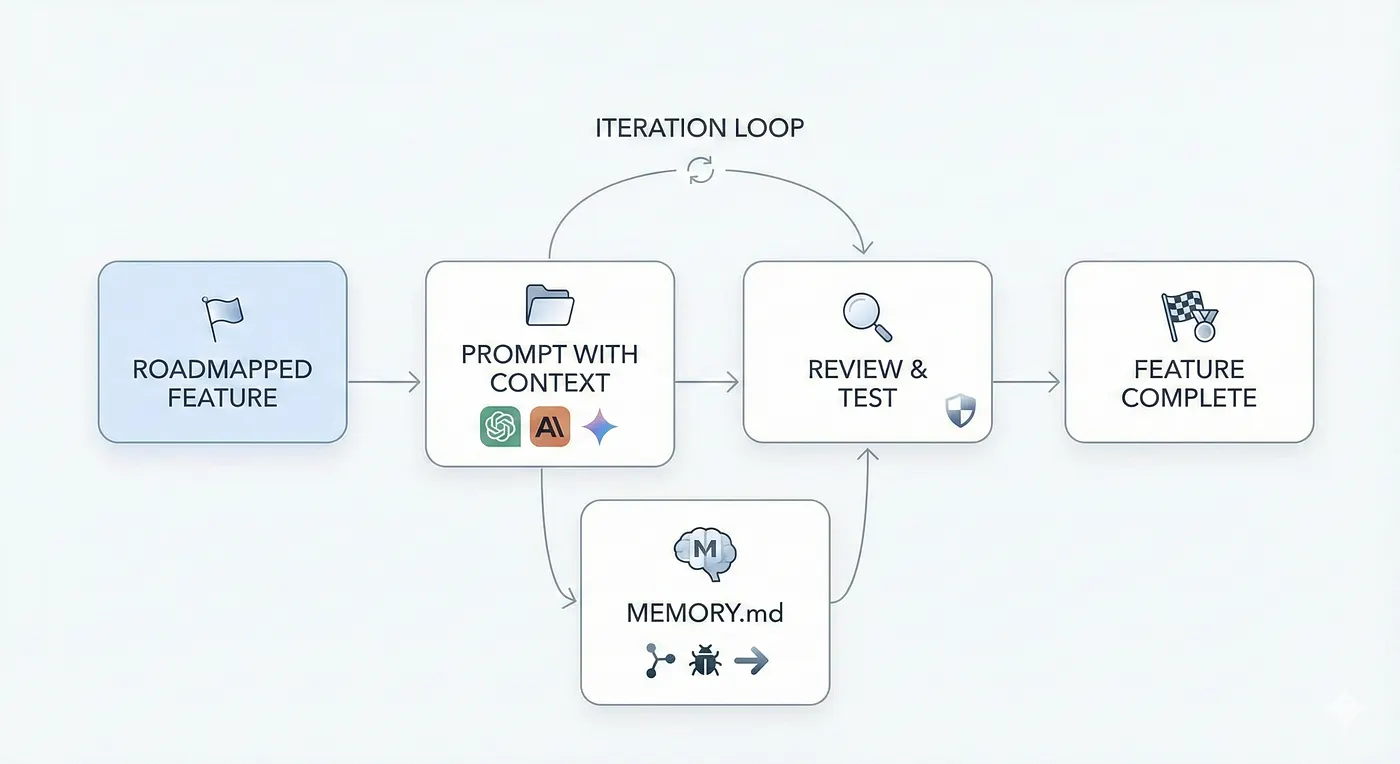
After I've created the folder housing all the markdown files, I begin what I call Burst Development — creating a feature roadmap that builds out features of the architecture in phases with small testable milestones instead of trying to get all the code out in one shot.
The WorkflowGETTING_STARTED.md
For each roadmapped feature, the following workflow is created:- Setup instructions (install deps, env vars, run commands)Not all development practices should be done in Cursor. I leverage specialized tools for specific parts of the software development journey.Found an interesting article but don't have 20 minutes?
-
Prompt with the roadmap context using
ARCHITECTURE.md- Common tasks (add endpoint, run migrations, debug) -
Include all necessary requirements and logic
-
Review and test generated code against your entire context markdown files and validate manually by testing the feature
-
Iterate until it works and passes all tests
-
Utilize a
MEMORY.mdto avoid prompt/context rot where agents begin to "forget" earlier decisionsQUICK_REFERENCE.md
Example MEMORY.md- Key commands (start server, run tests, format code)### Frontend Design: Figma AI + v0 by VercelYou go on Linkedin and see that someone built another AI Startup, so you load up VSCode and blank. You don’t know what to make or how to make, let’s say you know what to make you have this niche you’ve discovered and know exactly how you are going to disrupt the market.
# Project Memory
## Recent Changes (Dec 21, 2025)
- Implemented Gemini Vision agent in `agents/gemini_vision.py`## Phase 3: Burst Development
- Added retry logic with exponential backoff (1s, 2s, 4s max)
- Confidence scoring: 0.0 if field is missing, 0.5-1.0 based on clarityYou need UI mockups and React components fast. Describe your UI to Figma AI, export as PNG, feed into v0 by Vercel, and get production-ready component code in seconds.```
- Mock tests in `tests/test_gemini_agent.py` (no live API calls in CI)
After I've created the folder housing all the markdown files I begin what I call Burst Development. Creating a feature roadmap that builds out features of the architecture in phases with small testable milestones instead of trying to get all the code out in one shot.
## Known Issues
- Private LinkedIn profiles return 403—need fallback message
- Gemini occasionally returns nested JSON—add flattening logic
For each roadmapped feature the following workflow is created:
## Next Steps
- Implement database layer (Phase 3)### Database Schema: ChatGPT + SQL"Summarize this article about distributed caching. Phase 1: Accelerated Learning
- Test vision agent on 50 real profiles before moving on
```1. Prompt with the roadmap context using ARCHITECTURE.md
---2. Include all necessary requirements and logic
## Phase 4: Advanced Workflows — Specialized Tools3. Review and test generated code against your entire context markdown files and validate manually by testing the feature
4. Iterate until it works and passes all testsYou need optimized database schemas. ChatGPT generates the schema. You review, refine, and add to ARCHITECTURE.md.Give me key takeaways in bullet points."-----------------------------
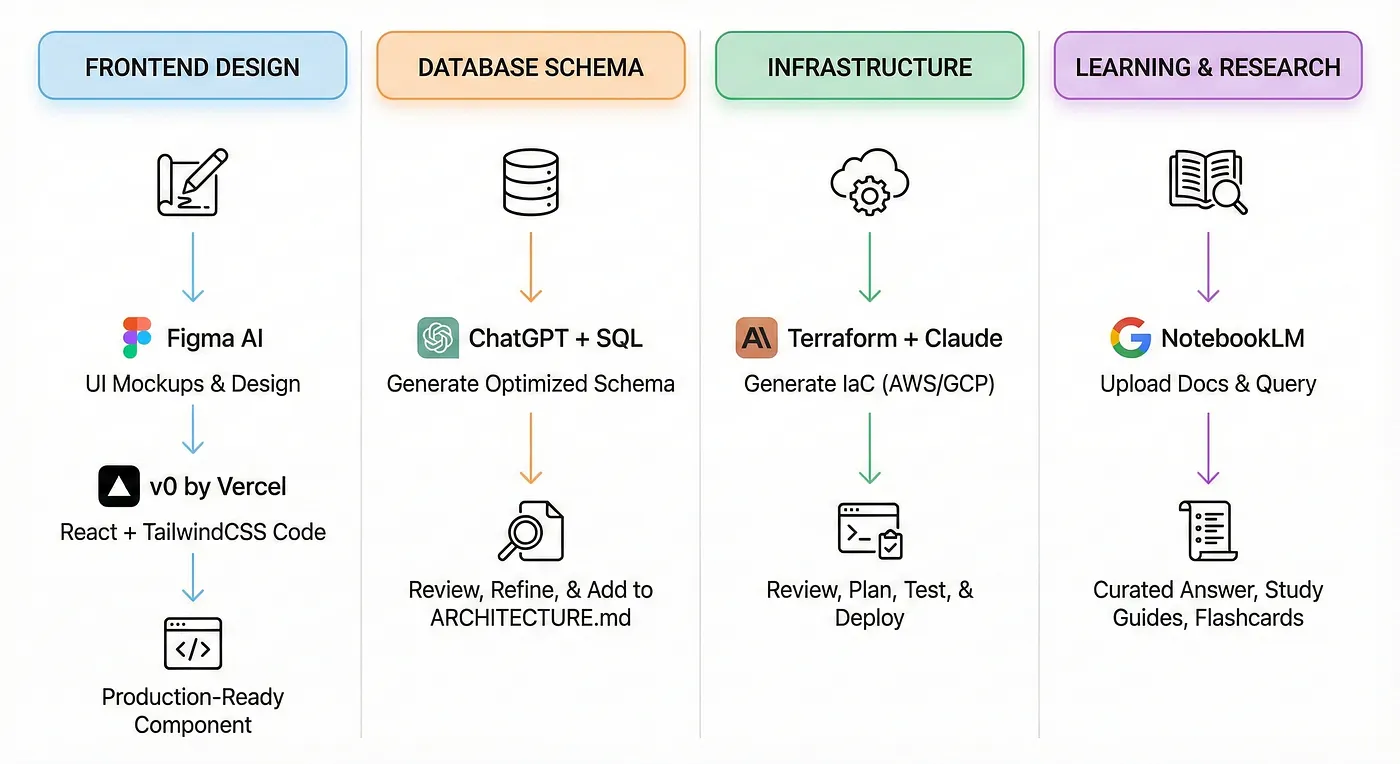
Not all development practices should be done in Cursor. I leverage **specialized tools** for specific parts of the software development journey.5. Utilize a MEMORY.md to avoid prompt/context rot where agents begin to "forget" earlier decisions
### Frontend Design: Figma AI + v0 by Vercel
**Use case:** You need UI mockups and React components fast.```markdown
**Workflow:**# Project Memory### Infrastructure: Terraform + Claude```
1. Describe your UI to Figma AI or sketch it manually
2. Export design as PNG or Figma link
3. Feed into v0 by Vercel: *"Convert this design to React + TailwindCSS"*
4. Get production-ready component code in seconds## Recent Changes (Dec 21, 2025)
---- Implemented Gemini Vision agent in `agents/gemini_vision.py`
### Database Schema: ChatGPT + SQL- Added retry logic with exponential backoff (1s, 2s, 4s max)You need to deploy your app to AWS/GCP. Claude generates IaC. You review, test locally with terraform plan, then deploy.
**Use case:** You need optimized database schemas.- Confidence scoring: 0.0 if field is missing, 0.5-1.0 based on clarity
**Workflow:**- Mock tests in `tests/test_gemini_agent.py` (no live API calls in CI)
```text
I'm building a recruiter outreach platform. I need a PostgreSQL schema for:
- Storing LinkedIn profile data (name, role, company, bio, hobbies)## Known Issues### Learning and Research: NotebookLMThat snippet stays in your brain and compounds over time.
- Storing generated emails (subject, body, sent status)
- Tracking which profiles have been processed- Private LinkedIn profiles return 403—need fallback message
Requirements:- Gemini occasionally returns nested JSON—add flattening logic
- Use JSONB for flexible profile data
- Add indexes for fast lookups by LinkedIn URL
- Include timestamps for created_at, updated_at
```## Next StepsYou need to understand a complex topic fast. Upload PDFs, articles, or docs to NotebookLM and get curated, context-aware answers.LLM’s are not a black box that can ship your product, you can’t always ctrl + c / ctrl + v and deploy, the understanding of the backend/frontend architecture as a developer is mandatory, as well as understanding the design patterns and complex architecture of an actual application.
ChatGPT generates the schema. You review, refine, and add to `ARCHITECTURE.md`.- Implement database layer (Phase 3)
---- Test vision agent on 50 real profiles before moving on
### Infrastructure: Terraform + Claude```
**Use case:** You need to deploy your app to AWS/GCP.## Phase 2: Context Engineering
**Workflow:**## Phase 4: Advanced Workflows — Specialized Tools
```text
Using Terraform, create infrastructure for:
- FastAPI backend on AWS ECS (Fargate)Not all development practices should be done in Cursor, I leverage specialized tools for specific parts of the software development journey.
- PostgreSQL RDS instance
- S3 bucket for Playwright screenshotsThis entire phase-based workflow will not only make development that much easier with emerging AI tools, but it will make you more adversed in using them. Only a small percentage of developers know how to architect systems with proper validation and context.* ChatGPT, Comet, Gemini, NotebookLM, Deepseek
- CloudFront CDN for React frontend
### Frontend Design: Figma AI + v0 by Vercel
Include security groups, IAM roles, and environment variables.
Claude generates IaC. You review, test locally with terraform plan, then deploy.Use case: You need UI mockups and React components fast. Workflow:
---Following these steps will not only make you a more confident developer but will allow you to be ahead in current AI trends and hopefully land you that internship you've always wanted!When I develop with agentic tools like Cursor, Claude, or Windsurf, I create a /docs folder that houses all my context files as markdown (.md). Think of these files as machine-interpretable configuration files — a README for agents, not humans.
Learning & Research: NotebookLM1. Describe your UI to Figma AI or sketch it manually
Use case: You need to understand a complex topic fast (e.g., distributed systems, Kafka, Kubernetes).2. Export design as PNG or Figma link
**Workflow:**3. Feed into v0 by Vercel: "Convert this design to React + TailwindCSS"These are the RESEARCHERS, I jump from tool to tool for different perspectives and LLM’s because it gives me that spark in my brain instead of just conforming to what output i’ve been given by any one of these tools. Simple prompt, massive results:
-
Upload PDFs, articles, or docs to NotebookLM
-
Ask: *"Summarize the key concepts of Kafka pub/sub in 5 bullet points"*4. Get production-ready component code in seconds
-
Generate study guides, flashcards, or even AI-generated podcasts
Having markdown files when prompting agentic systems are machine-interpretable configuration files that give the AI easier separation of concerns for the various layers of the applications. Think of it as a README for agents, because agents work better and stronger with clear instructions.
Example:
-
Upload AWS CloudFormation docs### Database Schema: ChatGPT + SQL
-
Ask: "How do I set up auto-scaling for ECS with CloudFormation?"
-
Get a curated, context-aware answer
---Use case: You need optimized database schemas. Workflow:
Conclusion### Separation of Concerns"Explain WebSocket connection pooling for real-time trading like I'm 5,
 ```
```
This entire phase-based workflow will not only make development that much easier with emerging AI tools, but it will make you more versed in using them. I'm building a recruiter outreach platform. I need a PostgreSQL schema for:then show me a production Python example."
Only a small percentage of developers know how to architect systems with proper validation and context. Following these steps will not only make you a more confident developer but will allow you to be ahead in current AI trends and hopefully land you that internship you've always wanted!- Storing LinkedIn profile data (name, role, company, bio, hobbies)
---- Storing generated emails (subject, body, sent status)Each .md file in the /docs folder represents a different layer of the application I am working on (Architecture, API Contracts, briefing files, workflows, conventions etc.) — it allows the agents to work better focusing on one task at a time.```
Tags: Software Engineering, Generative AI Tools, AI Agent, Agentic AI, Software Development- Tracking which profiles have been processed
Requirements:
-
Use JSONB for flexible profile data### Why use Markdown files?Step 2: Summarize what you’re too lazy to read
-
Add indexes for fast lookups by LinkedIn URL
-
Include timestamps for created_at, updated_at
Simply put, markdown files with structure (headers, lists, code blocks, examples) makes it easier for LLMs to extract step-by-step instructions without too many hallucinations. You're giving the agent a map instead of vague directions.Found an interesting article but don’t have 20 minutes?

ChatGPT generates the schema. You review, refine, and add to `ARCHITECTURE.md`.


### Infrastructure: Terraform + Claude

- **RAG friendly**: Feeding markdown files into the agent's context window (for RAG tools like `@docs` in Cursor) the LLM locates the relevant sections quickly.```

Use case: You need to deploy your app to AWS/GCP. Workflow:

- **Version control**: Markdowns can evolve in the repo structure, allowing you to track changes, revert bad changes, and maintain clear architectural decisions."Summarize this article about distributed caching.
Using Terraform, create infrastructure for:Give me key takeaways in bullet points."
-
FastAPI backend on AWS ECS (Fargate)
-
PostgreSQL RDS instance### Core Context Files```
-
S3 bucket for Playwright screenshots
-
CloudFront CDN for React frontend
Include security groups, IAM roles, and environment variables.ARCHITECTURE.mdThat snippet stays in your brain and compounds over time.
- High level system diagram (components of the system you want to make)
Claude generates IaC. You review, test locally with `terraform plan`, then deploy.
- Data flow (how the information moves)Phase 2: Context Engineering
### Learning & Research: NotebookLM
- External dependencies (APIs, databases, 3rd party services)----------------------------
Use case: You need to understand a complex topic fast (e.g., distributed systems, Kafka, Kubernetes). Workflow:
- Non-functional requirements (performance, scaling, caching)
1. Upload PDFs, articles, or docs to NotebookLM
2. Ask: "Summarize the key concepts of Kafka pub/sub in 5 bullet points"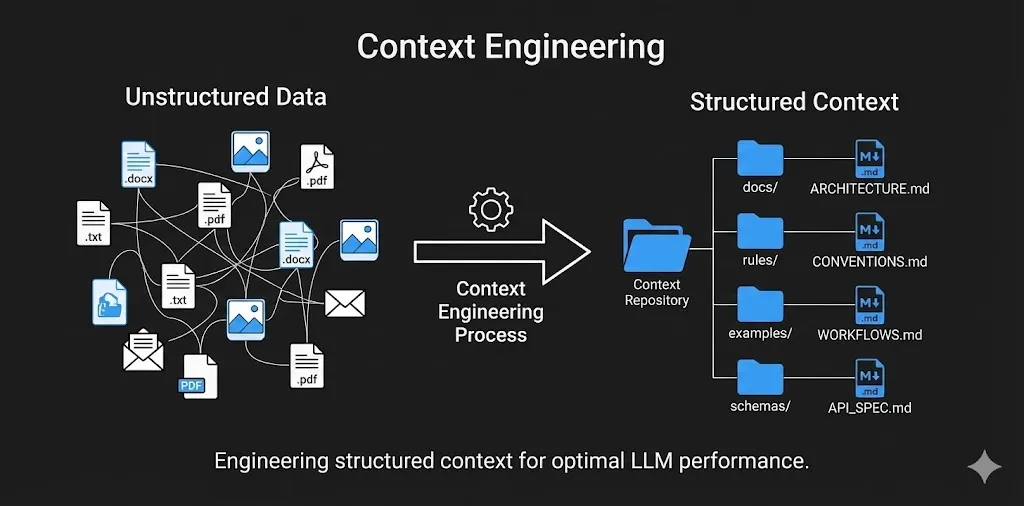
3. Generate study guides, flashcards, or even AI-generated podcasts
**CONVENTIONS.md**
Example:
- Upload AWS CloudFormation docs- Code style (error handling patterns, naming conventions)When I develop with agentic tools like Cursor, Claude, or Windsurf, I create a `/docs` folder that houses all my context files as markdown (`.md`). Think of these files as machine-interpretable configuration files, a README for agents, not humans.
- Ask: "How do I set up auto-scaling for ECS with CloudFormation?"
- Get a curated, context-aware answer- File structure (where to put services, models, tests)
## Conclusion- One-shot examples (show the agent "good code")Having markdown files when prompting agentic systems are machine-interpretable configuration files that give the AI easier separation of concerns for the various layers of the applications think of it as a README for agents, because agents work better and stronger with clear instructions
This entire phase based workflow will not only make development that much easier with emerging AI tools, but it will make you more adversed in using them. Only a small percentage of developers know how to architect systems with proper validation and context. Following these steps will not only make you a more confident developer but will allow you to be ahead in current AI trends and hopefully land you that internship you've always wanted!
**MVP_BRIEF.md**### Separation of Concerns
- Product vision (what problem are we solving?)
- Core features (scope for MVP)Each`.md` file in the `/docs` folder will represent a differnet layer of the application I am working on (Architecture, API Contracts, beifing files, workflows, conventions etc.) it allows the agents to work betetr focusing on one task at a time.
- Success metrics (how do we measure impact?)
### Why use Markdown files?
**MVP_PLAN.md**
- Feature roadmap (build order, dependencies)Simply put, markdown files with the structure (headers, list , code blocks, examples) makes it easier for LLM’s to extract step-by-step instructions without too many hallucinations, you’re giving the agent a map instead of vague directions.
- API contracts (endpoints, request/response shapes)
- Database schema details* **RAG friendly**: Feeding markdown files into the agent’s context window (for RAG tools like `@docs` in Cursor) the LLM locates the relevant sections quickly.
- Authentication flow* **Version control**: Markdowns can evolve in the repo structure, allowing you to track changes, revert bad changes, and maintain the clear architectural decisions
**WORKFLOWS.md**
### Core Context files
- Development process (how to add a new feature)
- Testing workflow (when to write tests, how to run them)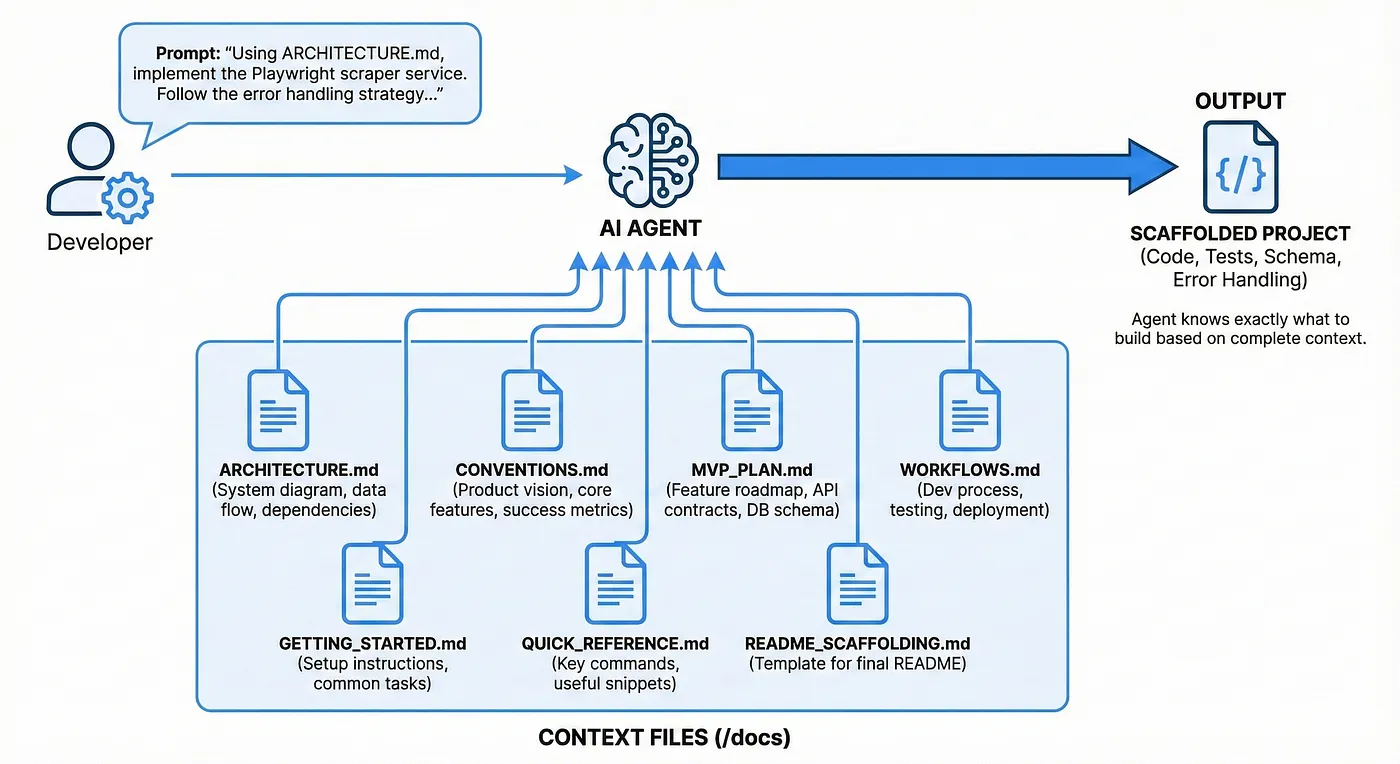
- Deployment steps (even if just "run locally" for MVP)
**ARCHITECUTRE.md**
### How this works?
* high level system diagram (components of the system you want to make)
You prompt the agent with:* data flow (how the information moves)
* external dependencies (API’s, databases, 3rd party services)
* Non-functional requirements (performance, scaling, caching)
Using ARCHITECTURE.md, implement the Playwright scraper service.
Follow the error handling strategy in the Scraper Layer section.Here’s a condensed example `ARCHITECTURE.md` file I made for a recruiter outreach application using Gemini to develop unique profiles for recruiters for “standout”
And the agent knows exactly what to build, the technology stack to begin scaffolding, as well as unit testing, error handling, table schema architecture, etc.# Recruiter Outreach Personalization Platform - Architecture
## Overview
## Phase 3: Burst Development**Purpose**: Automate personalized recruiter outreach by enriching LinkedIn profiles with Gemini 3 Vision, then generating tailored emails via LLM.
**Key Insight**: Gemini 3 Vision acts as an "intelligent scraper" that understands LinkedIn profile context (hobbies, interests, values) holistically, replacing brittle CSS selectors.
After I've created the folder housing all the markdown files, I begin what I call **Burst Development** — creating a feature roadmap that builds out features of the architecture in phases with small testable milestones instead of trying to get all the code out in one shot.## High-Level Data Flow
For each roadmapped feature the following workflow is created:LinkedIn Profile URL (user input)
↓
-
Prompt with the roadmap context using ARCHITECTURE.md [Playwright Scraper]
-
Include all necessary requirements and logic - Screenshot profile
-
Review and test generated code against your entire context markdown files and validate manually by testing the feature - Fetch HTML content
-
Iterate until it works and passes all tests ↓
-
Utilize a MEMORY.md to avoid prompt/context rot where agents begin to "forget" earlier decisions [Gemini 3 Vision Agent]
- Analyze screenshot + HTML
Example MEMORY.md: - Extract: name, (attempt) email, current role/company, outreach hooks, portfolio links, communication style
↓
# Project Memory         ↓

  [Store in PostgreSQL (JSONB columns)]

## Recent Changes (Dec 21, 2025)         ↓

- Implemented Gemini Vision agent in `agents/gemini_vision.py`  [Email Generator Service]

- Added retry logic with exponential backoff (1s, 2s, 4s max)    - Use enriched profile data

- Confidence scoring: 0.0 if field is missing, 0.5-1.0 based on clarity    - Call Gemini 3 Pro (text) with personalization context

- Mock tests in `tests/test_gemini_agent.py` (no live API calls in CI)         ↓

  [Generated Email]

## Known Issues    {

- Private LinkedIn profiles return 403—need fallback message      "subject_line": "...",

- Gemini occasionally returns nested JSON—add flattening logic      "body": "..."

    }

## Next Steps         ↓

- Implement database layer (Phase 3)  [Frontend Display]

- Test vision agent on 50 real profiles before moving on    - Show recruiter profile + generated email

```    - Allow manual editing

    - User manually sends via Gmail/LinkedIn

## Phase 4: Advanced Workflows — Specialized Tools```

## Core Components

Not all development practices should be done in Cursor. I leverage specialized tools for specific parts of the software development journey.### 1. **Playwright Scraper Service** (`scraper/`)

- **Input**: LinkedIn profile URL

### Frontend Design: Figma AI + v0 by Vercel- **Output**: Screenshot (bytes), HTML content (text)

- **Async**: Yes (concurrent profile fetching)

**Use case:** You need UI mockups and React components fast.- **Error Handling**: Timeout after 15s, retry once, log failures

- **Storage**: Temporary (disk), cleaned up after Gemini processing

**Workflow:****Key Functions**:

1. Describe your UI to Figma AI or sketch it manually- `screenshot_linkedin(url)` → bytes (PNG screenshot of full profile)

2. Export design as PNG or Figma link- `fetch_html(url)` → str (raw HTML for context)

3. Feed into v0 by Vercel: "Convert this design to React + TailwindCSS"- `cleanup()` → None (delete temp files)

4. Get production-ready component code in seconds---

### 2. **Gemini Vision Agent** (`agents/`)

### Database Schema: ChatGPT + SQL- **Input**: Screenshot (bytes), HTML (text), LinkedIn URL

- **Output**: Structured JSON (recruiter profile insights)

**Use case:** You need optimized database schemas.- **Model**: Gemini 3 Pro Vision

- **Cost**: ~$0.01 per call (included in free tier for MVP)

**Workflow:**- **Latency**: 2-3 seconds per profile

```**Responsibilities**:

I'm building a recruiter outreach platform. I need a PostgreSQL schema for:[define responsibilites]

- Storing LinkedIn profile data (name, role, company, bio, hobbies)**Failure Modes**:

- Storing generated emails (subject, body, sent status)[log parsing logic]

- Tracking which profiles have been processed---

### 3. **Enrichment Service** (`services/`)

Requirements:[service logic]

- Use JSONB for flexible profile data**Workflow**:

- Add indexes for fast lookups by LinkedIn URL[workflow creation]

- Include timestamps for created_at, updated_at---

```### 4. **Email Generator Service** (`email/`)

[service logic]

ChatGPT generates the schema. You review, refine, and add to `ARCHITECTURE.md`.**Responsibilities**:

[define responsibilites]

### Infrastructure: Terraform + Claude---

### 5. **Database** (`postgres/`)

**Use case:** You need to deploy your app to AWS/GCP.

**Tables**:

**Workflow:** DEFINE THE SCHEMA HERE

Using Terraform, create infrastructure for:---

- FastAPI backend on AWS ECS (Fargate)## Technology Stack

- PostgreSQL RDS instance| Layer | Tech | Why |

- S3 bucket for Playwright screenshots|-------|------|-----|

- CloudFront CDN for React frontend| **Backend** | FastAPI + asyncio | Fast MVP, native async for I/O (Gemini waits) |

| **Scraping** | Playwright | 40% faster than Selenium, native async |

Include security groups, IAM roles, and environment variables.| **Vision AI** | Gemini 3 Pro Vision | Multimodal, context-aware, free tier sufficient |

| **Email LLM** | Gemini 3 Pro (text) | Cheap, personalization expert |

| **Database** | PostgreSQL | JSONB for enriched data, full-text search (future) |

Claude generates IaC. You review, test locally with `terraform plan`, then deploy.| **Frontend** | React + Vite | Fast, simple state management (Zustand) |

| **Deployment** | Out of scope (MVP) | Run locally; decide hosting later |
How this works?
You prompt the agent with:
Using ARCHITECTURE.md, implement the Playwright scraper service. Follow the error handling strategy in the Scraper Layer section. And the agent knows exactly what to build, and technology stack to begin scaffolding as well as unit testing, error handling, table schema architecture etc.
Other essential files include:
Your ARCHITECTURE.md is the foundation, but you need supporting files for a complete context system:
CONVENTIONS.md
- Code style (error handling patterns, naming conventions)
- File structure (where to put services, models, tests)
- One-shot examples (show the agent “good code”)
MVP_BRIEF.md
- Product vision (what problem are we solving?)
- Core features (scope for MVP)
- Success metrics (how do we measure impact?)
MVP_PLAN.md
- Feature roadmap (build order, dependencies)
- API contracts (endpoints, request/response shapes)
- Database schema details
- Authentication flow
WORKFLOWS.md
- Development process (how to add a new feature)
- Testing workflow (when to write tests, how to run them)
- Deployment steps (even if just “run locally” for MVP)
GETTING_STARTED.md
- Setup instructions (install deps, env vars, run commands)
- Common tasks (add endpoint, run migrations, debug)
QUICK_REFERENCE.md
- Key commands (start server, run tests, format code)
- Useful snippets (common patterns, utility functions)
README_SCAFFOLDING.md (optional)
- Template for final README once MVP is done
- Ensures consistency across projects
Phase 3: Burst Development
After I’ve created the folder housing all the markdown files I begin what I call Burst Development. Creating a feature roadmap that builds out features of the architecture in phases with small testable milestones instead of trying to get all the code out in one shot.
For each roadmapped feature the following workflow is created:
- Prompt with the roadmap context using ARCHITECTURE.md
- Include all necessary requirements and logic
- Review and test generated code against your entire context markdown files and validate manually by testing the feature
- Iterate until it works and passes all tests
- Utilize a MEMORY.md to avoid prompt/context rot where agents begin to “forget” earlier decisions
# Project Memory
## Recent Changes (Dec 21, 2025)
- Implemented Gemini Vision agent in `agents/gemini_vision.py`
- Added retry logic with exponential backoff (1s, 2s, 4s max)
- Confidence scoring: 0.0 if field is missing, 0.5-1.0 based on clarity
- Mock tests in `tests/test_gemini_agent.py` (no live API calls in CI)
## Known Issues
- Private LinkedIn profiles return 403—need fallback message
- Gemini occasionally returns nested JSON—add flattening logic
## Next Steps
- Implement database layer (Phase 3)
- Test vision agent on 50 real profiles before moving on
Phase 4: Advanced workflows — Specialized tools
Not all development practices should be done in Cursor, I leverage specialized tools for specific parts of the software development journey.
Frontend Design: Figma AI + v0 by Vercel
Use case: You need UI mockups and React components fast. Workflow:
- Describe your UI to Figma AI or sketch it manually
- Export design as PNG or Figma link
- Feed into v0 by Vercel: “Convert this design to React + TailwindCSS”
- Get production-ready component code in seconds
Database Schema: ChatGPT + SQL
Use case: You need optimized database schemas. Workflow:
I'm building a recruiter outreach platform. I need a PostgreSQL schema for:
- Storing LinkedIn profile data (name, role, company, bio, hobbies)
- Storing generated emails (subject, body, sent status)
- Tracking which profiles have been processed
Requirements:
- Use JSONB for flexible profile data
- Add indexes for fast lookups by LinkedIn URL
- Include timestamps for created_at, updated_at
ChatGPT generates the schema. You review, refine, and add to ARCHITECTURE.md.
Infrastructure: Terraform + Claude
Use case: You need to deploy your app to AWS/GCP. Workflow:
Using Terraform, create infrastructure for:
- FastAPI backend on AWS ECS (Fargate)
- PostgreSQL RDS instance
- S3 bucket for Playwright screenshots
- CloudFront CDN for React frontend
Include security groups, IAM roles, and environment variables.
Claude generates IaC. You review, test locally with terraform plan, then deploy.
Learning & Research: NotebookLM
Use case: You need to understand a complex topic fast (e.g., distributed systems, Kafka, Kubernetes). Workflow:
- Upload PDFs, articles, or docs to NotebookLM
- Ask: “Summarize the key concepts of Kafka pub/sub in 5 bullet points”
- Generate study guides, flashcards, or even AI-generated podcasts
Example:
- Upload AWS CloudFormation docs
- Ask: “How do I set up auto-scaling for ECS with CloudFormation?”
- Get a curated, context-aware answer
Conclusion

This entire phase based workflow will not only make development that much easier with emerging AI tools, but it will make you more adversed in using them. Only a small percentage of developers know how to architect systems with proper validation and context. Following these steps will not only make you a more confident developer but will allow you to be ahead in current AI trends and hopefully land you that internship you’ve always wanted!